Terrakube
 AzBuilder
I spent the last day trying out Terrakube, at the time of writing v2.21.4.
Since I am often commuting it seemed nice to have a UI that does not require to setup anything on whatever device I am using.
Source code: https://github.com/DorskFR/ghost.dorsk.dev/tree/main/overlays/terrakube
tl;dr
I ended up not using it. The project did not seem mature enough to me:
- I failed to apply my own rule not to spend more than 30min-1h to setup a project due to https://en.wikipedia.org/wiki/Sunk_cost
- Having to fix an infrastructure setup defined with localhost values, minikube as a target,
/etc/hostshacks and unnecessary dependencies is always a bit tiring. - There is some default configuration already preloaded upon first start which requires cleanup.
- The state management did not allow me to reuse the same state from different tools. I have been using a bucket as my remote backend for a while and I was expecting Terrakube to function similarly reusing the same state file so that I could apply either from OpenTofu's CLI tool or from Terrakube and stay in sync.
- The variables UI is simple and does not match my usage. Allowing to upload / edit a
terraform.tfvarsfile via the UI would have been a better experience.
Installation
Looking at the usual places:
- kubectl/kustomize example: there was none
- helm chart: https://github.com/AzBuilder/terrakube-helm-chart
- docker-compose: https://github.com/AzBuilder/terrakube/blob/main/docker-compose/docker-compose.yaml
I first looked at extracting the Helm chart as per the documentation at: https://docs.terrakube.io/getting-started/deployment
helm repo add terrakube-repo https://AzBuilder.github.io/terrakube-helm-chart
helm repo update
helm template terrakube terrakube-repo/terrakube \
--namespace security \
--include-crds \
| yq eval 'del(.metadata.labels["helm.sh/chart"], .metadata.labels["app.kubernetes.io/managed-by"])' - > manifest.yamlThis gives a manifest.yaml to look at but as expected the default is to create many supporting services that are not the core of what terrakube does: dex, ldap, minio, etc.
I did not really like what the helm chart was creating so I figured I would create a kustomize structure instead and in the end mostly used the docker-compose as a reference:
.
├── kustomization.yaml
├── api
│   ├── certificate.yaml
│   ├── deployment.yaml
│   ├── ingress.yaml
│   ├── kustomization.yaml
│   ├── service.yaml
│   └── serviceaccount.yaml
├── database
│   ├── deployment.yaml
│   ├── kustomization.yaml
│   ├── pvc.yaml
│   ├── service.yaml
│   └── serviceaccount.yaml
├── dex
│   ├── files
│   │   └── config.yaml
│   ├── certificate.yaml
│   ├── deployment.yaml
│   ├── ingress.yaml
│   ├── kustomization.yaml
│   ├── rbac.yaml
│   ├── service.yaml
│   └── serviceaccount.yaml
├── executor
│   ├── deployment.yaml
│   ├── kustomization.yaml
│   ├── service.yaml
│   └── serviceaccount.yaml
├── redis
│   ├── deployment.yaml
│   ├── kustomization.yaml
│   ├── service.yaml
│   └── serviceaccount.yaml
├── registry
│   ├── certificate.yaml
│   ├── deployment.yaml
│   ├── ingress.yaml
│   ├── kustomization.yaml
│   ├── service.yaml
│   └── serviceaccount.yaml
└── ui
    ├── files
    │   └── env-config.js
    ├── certificate.yaml
    ├── deployment.yaml
    ├── ingress.yaml
    ├── kustomization.yaml
    ├── service.yaml
    └── serviceaccount.yaml

10 directories, 41 files
Configuration
Since the default configuration is made for local usage, I went ahead to edit a few things:
Remove port mappings as this is mostly docker-compose related, in my setup ingresses take care of port mapping.
Create an ingress with a public host domain for each URL called by the UI:
- https://terrakube.example.com (terrakube-ui)
- https://terrakube-api.example.com
- https://terrakube-dex.example.com
- https://terrakube-registry.example.com
Updated the terrakube-ui env-config.js with the above host domains.
window._env_ = {
  REACT_APP_TERRAKUBE_API_URL: "https://terrakube-api.example.com/api/v1/",
  REACT_APP_CLIENT_ID: "terrakube",
  REACT_APP_AUTHORITY: "https://terrakube-dex.example.com/dex",
  REACT_APP_REDIRECT_URI: "https://terrakube.example.com",
  REACT_APP_REGISTRY_URI: "https://terrakube-registry.example.com",
  REACT_APP_SCOPE: "email openid profile offline_access groups",
  REACT_APP_TERRAKUBE_VERSION: "2.21.1",
}
Updated terrakube-dex config.yaml with the public URLs where applicable and with the LDAP backend I use which is https://github.com/lldap/lldap. I also replaced the clear text password with an environment variable. In lldap I created the terrakube user and the TERRAKUBE_ADMIN group:
issuer: https://terrakube-dex.example.com/dex

storage:
  type: memory

web:
  http: 0.0.0.0:5556
  allowedOrigins: ['*']

oauth2:
  responseTypes: ["code", "token", "id_token"]
  skipApprovalScreen: true

connectors:
- type: ldap
  name: LLDAP
  id: ldap
  config:
    host: lldap.security.svc.cluster.local:3890
    insecureNoSSL: true
    bindDN: uid=terrakube,ou=people,dc=example,dc=com
    bindPW: $LLDAP_TERRAKUBE_BINDPW

    usernamePrompt: Username

    userSearch:
      baseDN: ou=people,dc=example,dc=com
      filter: (objectClass=person)
      username: uid

      idAttr: DN
      emailAttr: mail
      nameAttr: cn

    groupSearch:
      baseDN: ou=groups,dc=example,dc=com
      filter: (objectClass=groupOfNames)
      userMatchers:
        - groupAttr: member
          userAttr: DN
      nameAttr: cn

staticClients:
  - id: terrakube
    name: terrakube
    public: true
    redirectURIs:
      - https://terrakube.example.com
      - /device/callback
      - http://localhost:10000/login
      - http://localhost:10001/login
Since I use https://github.com/bank-vaults/bank-vaults for the secrets combined with https://www.hashicorp.com/products/vault. I used terraform to define the secrets into vault and add the role annotations.
AwsStorageAccessKey          = "S3_ACCESS_KEY"
AwsStorageBucketName         = "S3_BUCKET_NAME"
AwsStorageSecretKey          = "S3_SECRET_KEY"
AwsTerraformOutputAccessKey  = "S3_ACCESS_KEY"
AwsTerraformOutputBucketName = "S3_BUCKET_NAME"
AwsTerraformOutputSecretKey  = "S3_SECRET_KEY"
AwsTerraformStateAccessKey   = "S3_ACCESS_KEY"
AwsTerraformStateBucketName  = "S3_BUCKET_NAME"
AwsTerraformStateSecretKey   = "S3_SECRET_KEY"
DatasourcePassword           = "MY_POSTGRES_PASSWORD"
DatasourceUser               = "MY_POSTGRES_ADMIN"
InternalSecret               = "MY_INTERNAL_SECRET" # Not sure I used this
LLDAP_TERRAKUBE_BINDPW       = "MY_LDAP_PASSWORD_FOR_TERRAKUBE_USER"
PatSecret                    = "MY_PAT_SECRET" # Not sure I used this
POSTGRES_PASSWORD            = "MY_POSTGRES_PASSWORD"
POSTGRES_USER                = "MY_POSTGRES_ADMIN"
REDIS_PASSWORD               = "MY_REDIS_PASSWORD" # Defined this but the jedis client kept complaining about no password
TerrakubeRedisPassword       = "MY_REDIS_PASSWORD"
I defined common environment variables in a configMapGenerator in the root kustomization.yaml and the ones scoped to just one project in their respective configmap. The configmap name references the subdirectory:
configMapGenerator:
  - literals:
      - AwsEndpoint="https://minio.example.com"
      - AwsStorageRegion="us-east-1"
      - AzBuilderApiUrl="https://terrakube-api.example.com"
      - DexIssuerUri="https://terrakube-dex.example.com/dex"
      - TerrakubeEnableSecurity="true"
      - TerrakubeRedisHostname="terrakube-redis"
      - TerrakubeRedisPort="6379"
      - TerrakubeUiURL="https://terrakube.example.com"
    name: terrakube
configMapGenerator:
- literals:
- AzBuilderRegistry="https://terrakube-registry.example.com"
- AuthenticationValidationTypeRegistry="DEX"
- AppClientId="terrakube"
- AppIssuerUri="https://terrakube-dex.example.com/dex"
- RegistryStorageType="AwsStorageImpl"
name: terrakube-registryconfigMapGenerator:
- literals:
- AwsTerraformOutputRegion="us-east-1"
- AwsTerraformStateRegion="us-east-1"
- ExecutorFlagBatch="false"
- ExecutorFlagDisableAcknowledge="false"
- TerraformOutputType="AwsTerraformOutputImpl"
- TerraformStateType="AwsTerraformStateImpl"
- TerrakubeApiUrl="https://terrakube-api.example.com"
- TerrakubeRegistryDomain="terrakube-registry:8075"
- TerrakubeToolsBranch="main"
- TerrakubeToolsRepository="https://github.com/AzBuilder/terrakube-extensions"
name: terrakube-executorconfigMapGenerator:
- literals:
- POSTGRES_DB=terrakube
name: terrakube-databaseconfigMapGenerator:
- literals:
- ApiDataSourceType="POSTGRESQL"
- AuthenticationValidationType="DEX"
- AzBuilderExecutorUrl="http://terrakube-executor:8090/api/v1/terraform-rs"
- DatasourceDatabase="terrakube"
- DatasourceHostname="terrakube-database"
- DatasourcePort="5432"
- DatasourceSchema="public"
- DatasourceSslMode="disable"
- DexClientId="terrakube"
- GroupValidationType="DEX"
- ModuleCacheMaxIdle="128"
- ModuleCacheMaxTotal="128"
- ModuleCacheMinIdle="64"
- ModuleCacheSchedule="0 */3 * ? * *"a
- ModuleCacheTimeout="600000"
- spring_profiles_active="demo"
- StorageType="AWS"
- TERRAKUBE_ADMIN_GROUP="TERRAKUBE_ADMIN"
- TerrakubeHostname="terrakube-api.example.com"
- UserValidationType="DEX"
name: terrakube-apiInitialization
After applying OpenTofu for this project I had the following resources created:
- Vault role, policies, etc. associated with the different service accounts for this project.
- Cloudflare host domains.
- MinIO bucket and user, service account, policies, scoped to the bucket.
- ArgoCD project which in turn deployed the kubernetes resources.
I could then login at the terrakube-ui URL. (https://terrakube.example.com)
Upon first login, we are greeted with preloaded sample organization, workspace, etc.
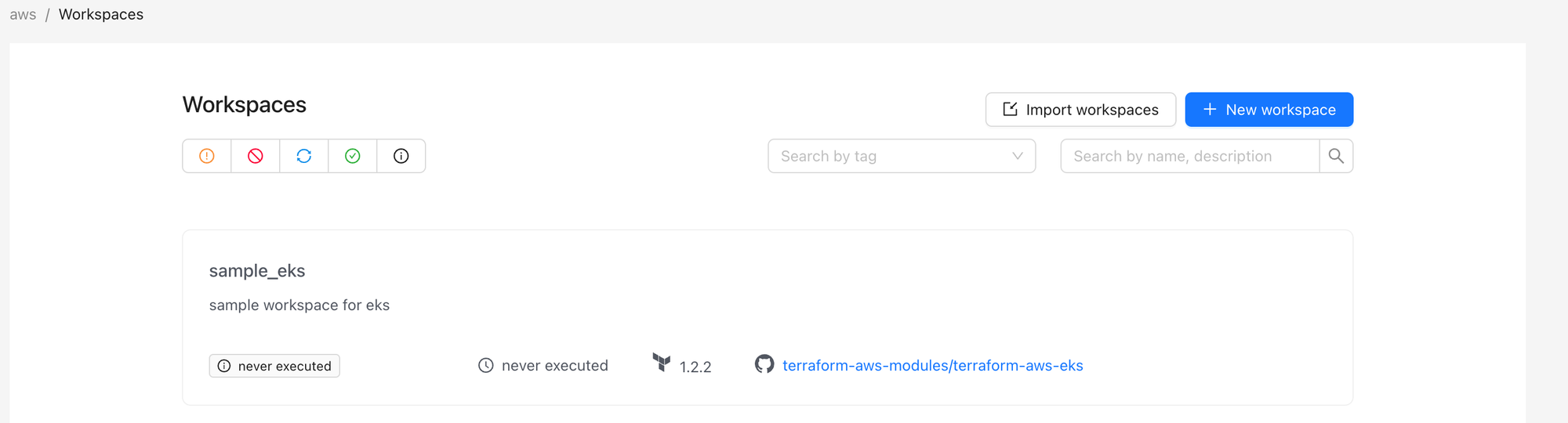
These in turn trigger terrakube-api to make calls that ultimately fail due to credentials being not set. So I deleted all of those to begin with. It is possible via the UI but I went to the database instead.
psql -U terrakube-admin -d terrakube
terrakube=# delete from module;
DELETE 15
terrakube=# delete from workspacetag;
DELETE 5
terrakube=# delete from workspace;
DELETE 19
terrakube=# delete from team;
DELETE 11
terrakube=# delete from template;
DELETE 25
terrakube=# delete from tag;
DELETE 4
terrakube=# delete from organization;
DELETE 5
As a side note, when deleting an organization via the UI, the resource still exists and a flag disabled is set instead. Which prevents creating a new organization with the same name. Deleting in database bypasses this.
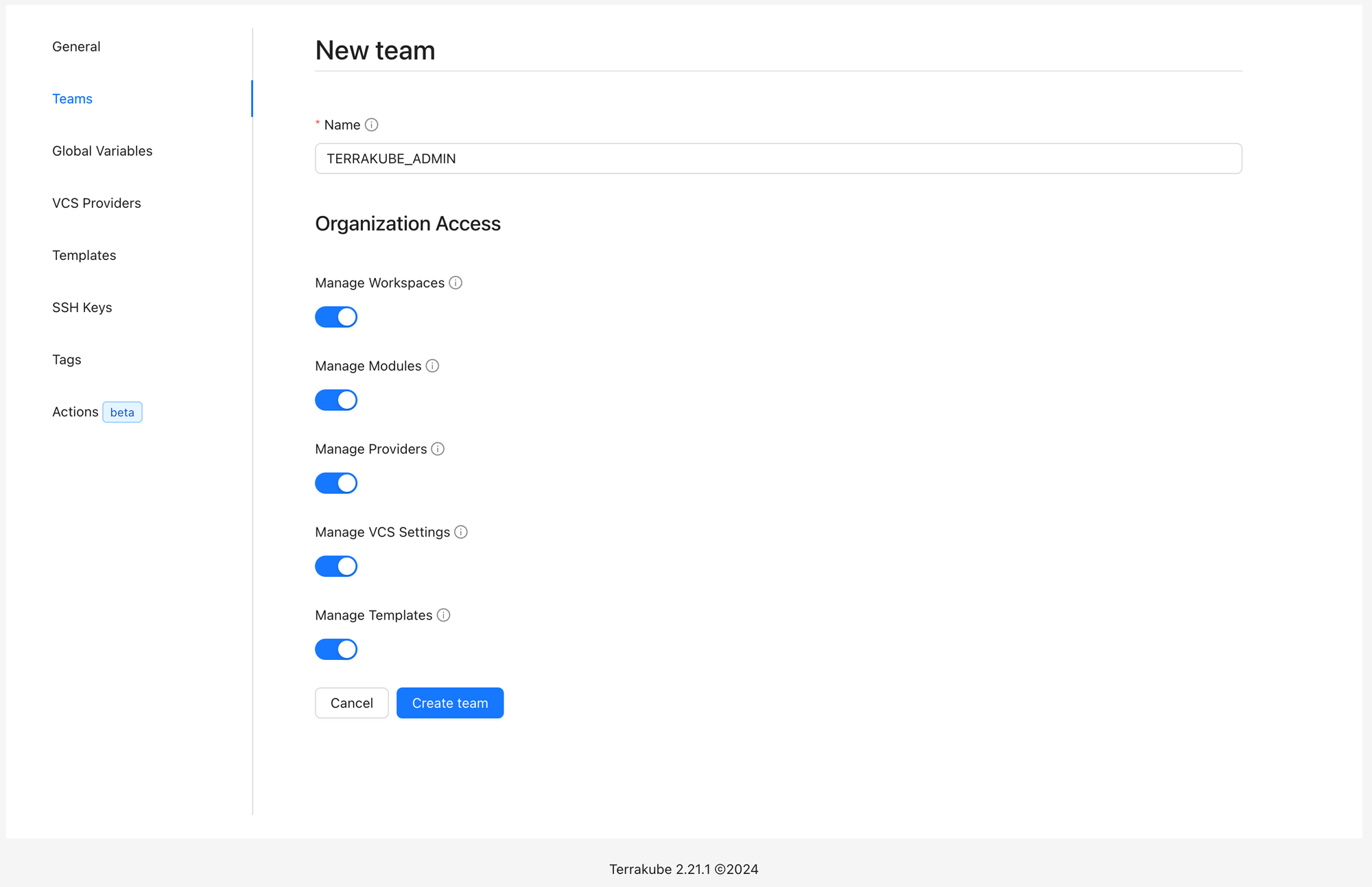
I was then able to create a new organization and to create a team TERRAKUBE_ADMIN which has to match the ldap group for the user.
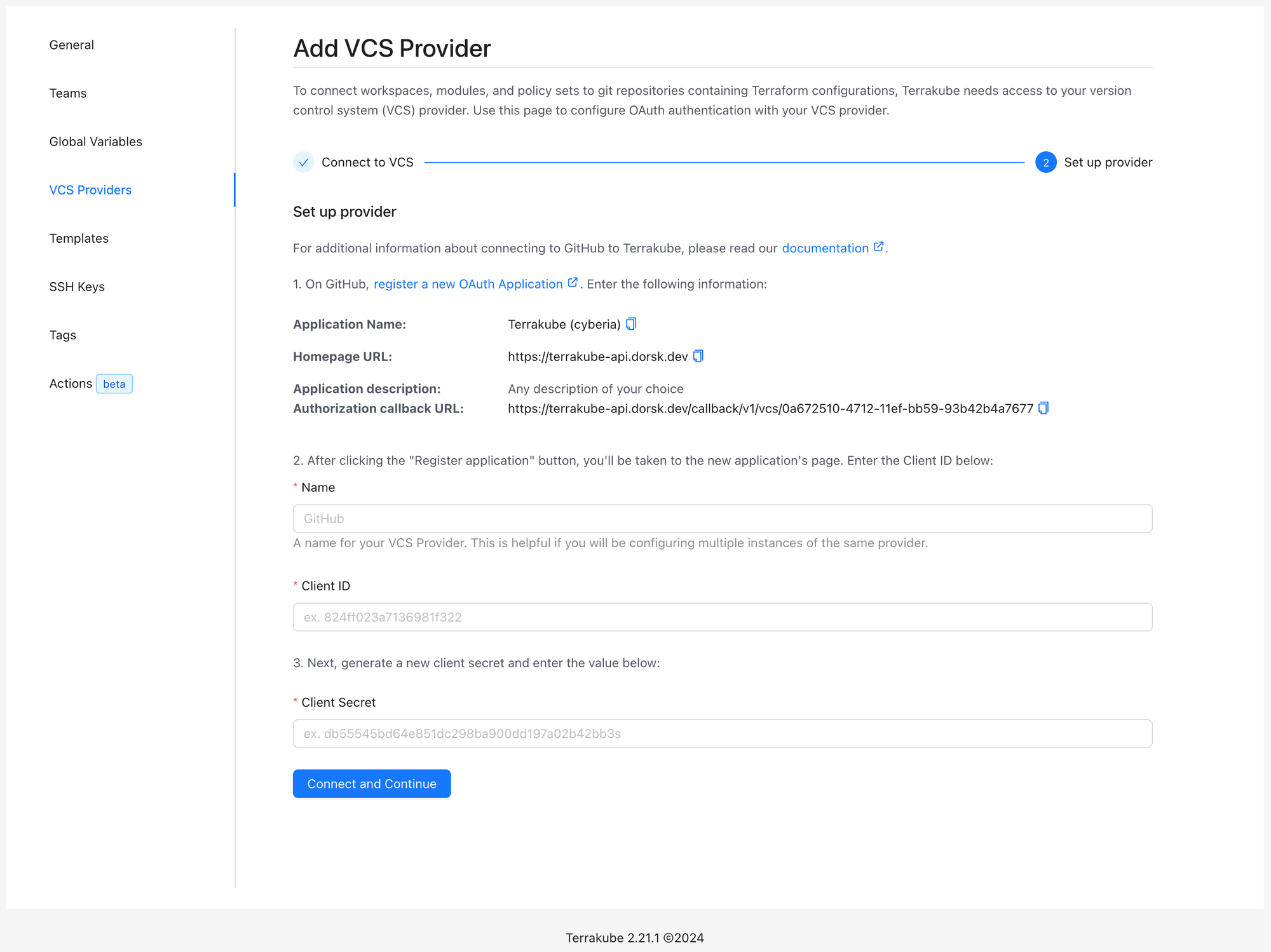
While I use https://codeberg.org/Forgejo/forgejo for some repositories I mainly use github and therefore added it as a VCS provider first. This part was easy and worked on first try simply following the instructions:
Next I created a workspace using OpenTofu and Version control workflow, using the above created GitHub integration and specifying main branch, my /terraform folder, etc. Nothing happened when I clicked Create Workspace and I had an unauthorized error in the terrakube-api logs.
However the workspace did get created successfully as confirmed by navigating to workspaces.
Migrating state
Next was migrating state, I followed the instructions at https://docs.terrakube.io/user-guide/migrating-to-terrakube
tofu state pull > tf.stateThen replace my backend.tf with the following cloud block
terraform {
  cloud {
    organization = "my-organization"
    hostname = "terrakube-api.example.com"
    workspaces {
      name = "my-infra-workspace"
    }
  }
}
and ran the suggested:
tofu login terrakube-api.example.comNote that if you already have a login state for some reason you can clear it in the file $HOME/.terraform.d/credentials.tfrc.json
Followed by:
tofu init

> Should OpenTofu migrate your existing state?
> Enter a value: no # I assume yes would work too
And finally:
tofu state push tf.stateNote that the above would only work if the TerrakubeHostname environment variable is correctly defined in the terrakube-api configmap.
I also had to adapt the ingress to allow my state to upload:
metadata:
  name: terrakube-api
  annotations:
    nginx.ingress.kubernetes.io/proxy-body-size: "0"
Apply
I then tried a plan in the UI which failed with the following logs:
INFO 1 --- [nio-8080-exec-5] o.t.a.p.s.aws.AwsStorageTypeServiceImpl  : Searching: /tfoutput/context/10/context.json
ERROR 1 --- [nio-8080-exec-5] o.t.a.p.s.aws.AwsStorageTypeServiceImpl  : S3 Not found: The specified key does not exist. (Service: Amazon S3; Status Code: 404; Error Code: NoSuchKey; Request ID: 17E4262EB3C1E5F8; S3 Extended Request ID: dd9025bab4ad464b049177c95eb6ebf374d3b3fd1af9251148b658df7ac2e3e8;Proxy: null)
But at this point there is effectively a state uploaded:
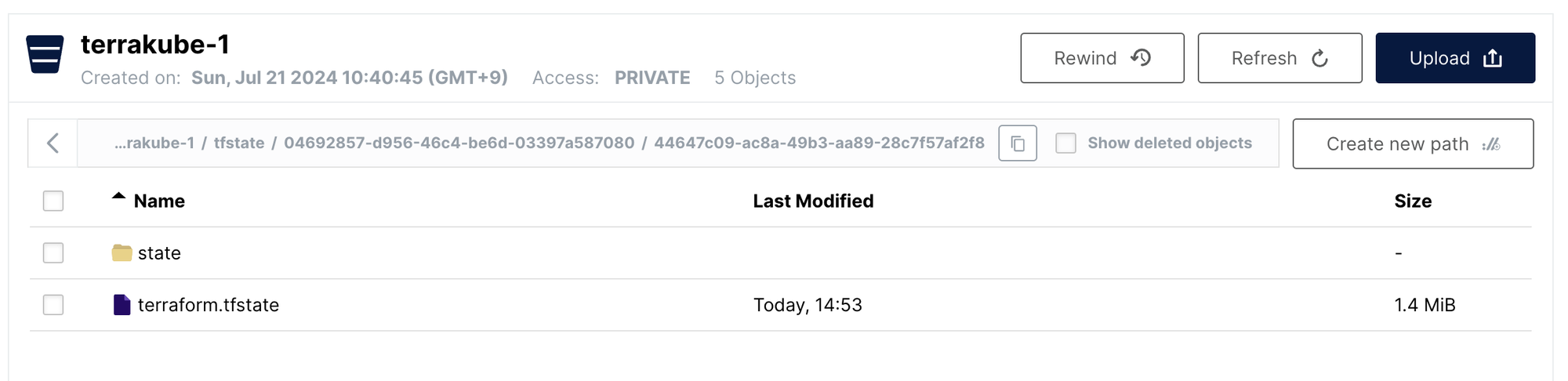
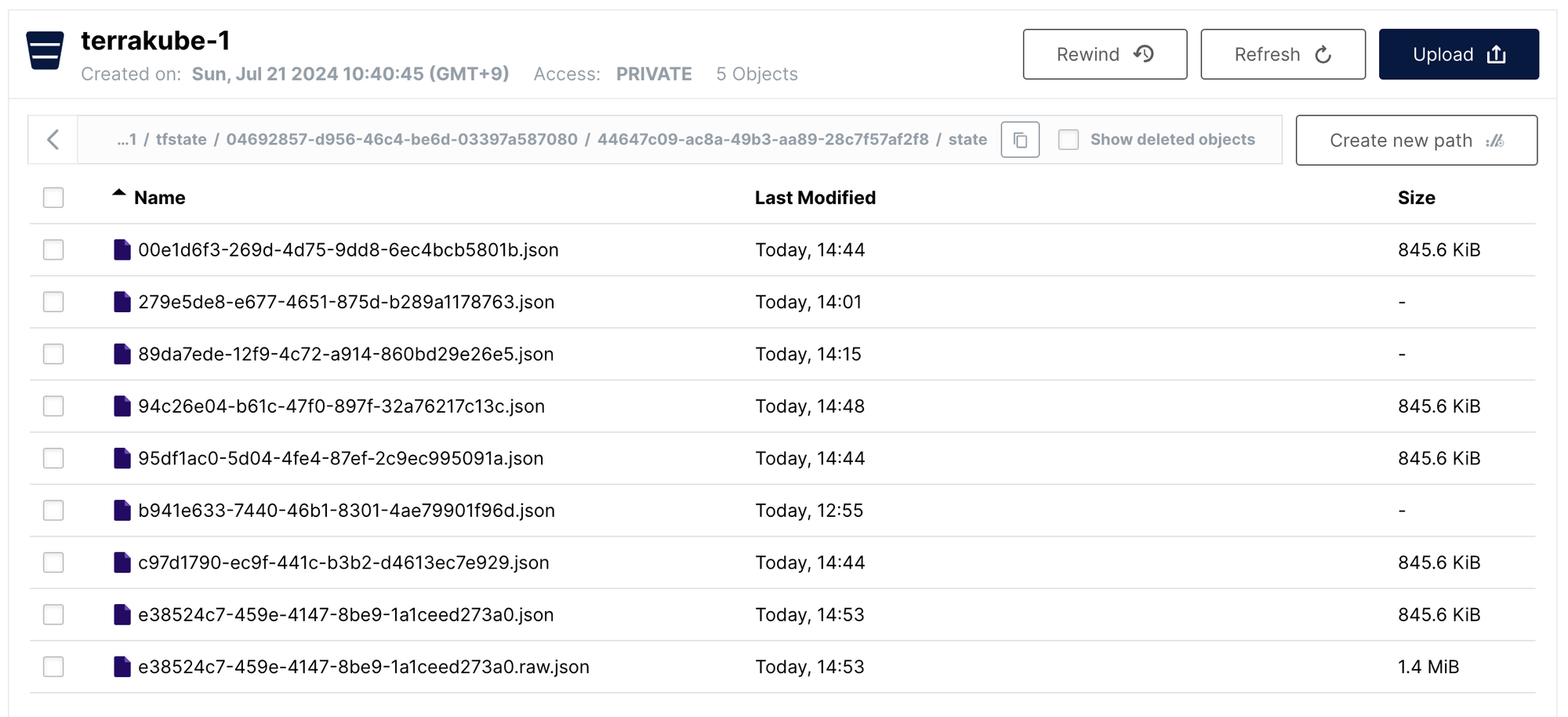
Since I use terraform.vars locally I figured this was maybe the variables being undefined and tried to define them in the UI.
In my setup I use few but large objects in my variables:
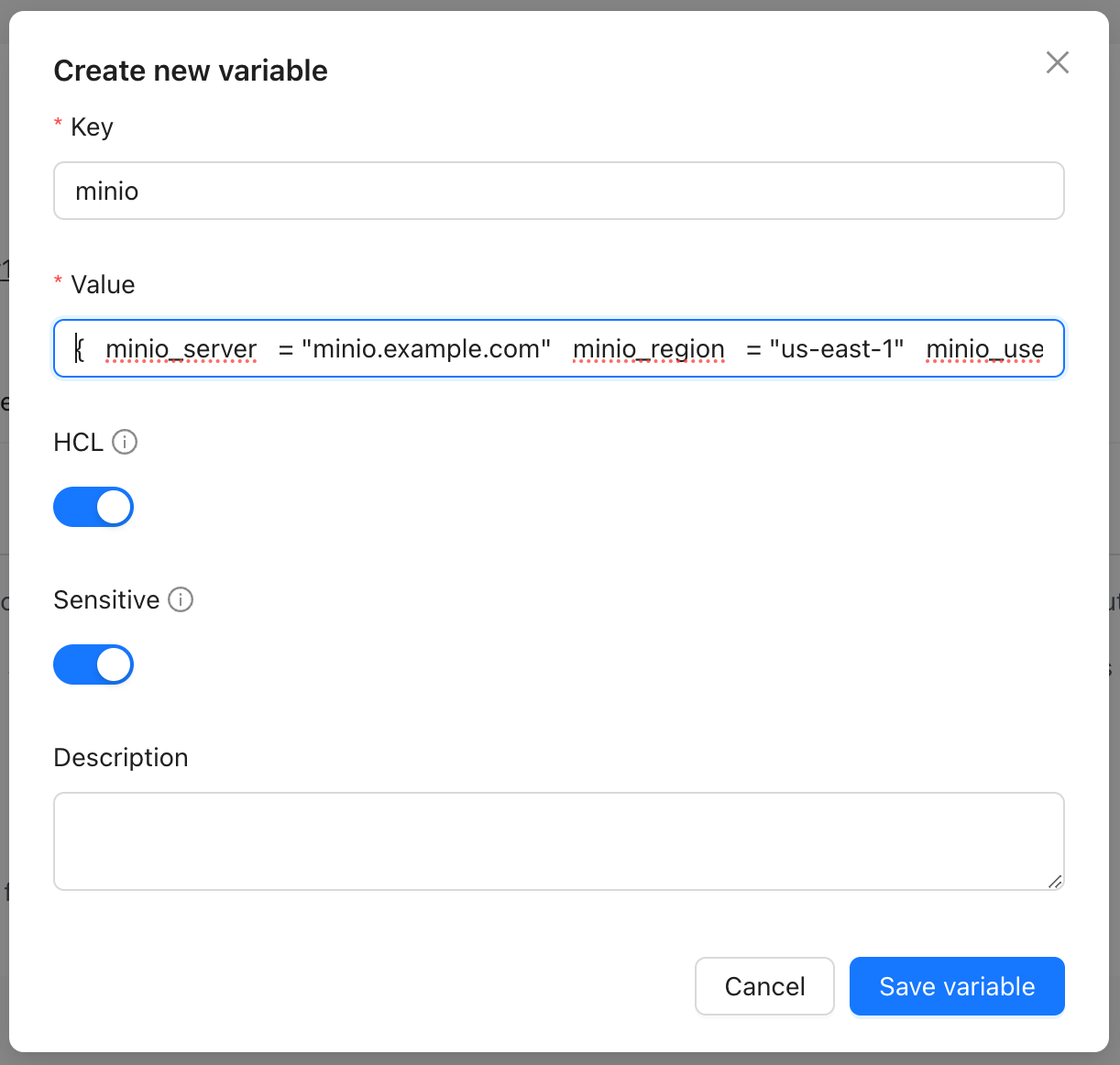
Which exceeds the column limit as it is stored in database.
WARN 1 --- [       task-217] o.h.engine.jdbc.spi.SqlExceptionHelper   : SQL Error: 0, SQLState: 22001
ERROR 1 --- [       task-217] o.h.engine.jdbc.spi.SqlExceptionHelper   : ERROR: value too long for type character varying(3072) terrakube-api-644d98758-zb8l2 2024-07-21T06:44:13.154Z ERROR 1 --- [       task-217] c.y.e.d.j.t.AbstractJpaTransaction       : Caught entity manager exception during flush
It would be nice to directly upload / edit terraform.tfvars
Not sure if that was the main reason but I could not have the plan command complete.
Conclusion
In the end I spent about a day reading issues and digging through the logs to figure out the settings above and thought I would stop it there for now.
I might revisit later if the project matures or will next look https://github.com/diggerhq/digger if I wanted to use CI/CD triggers.
Or I will just keep using my machine / ssh into my server to apply terraform manually.